
Commercial Finance CRM
Three brokers are handling new borrower inquiries, chasing financial statements, submitting applications to lenders, and answering funding questions. Meanwhile, one deal is waiting on a missing document, another needs reassignment, and a third has received a lender nobody has recorded. When deal volume rises, keeping everything straight becomes harder.
Can your team see each deal’s status, owner, and next action without searching through spreadsheets and inboxes? A commercial finance CRM helps organize those moving parts. Understanding its core technology, integrations, and workflow capabilities helps brokerages choose a system that supports growth without adding administrative friction.
Table of Contents
What Is a Commercial Finance CRM?
The Core Tech Stack Behind a High-Volume Brokerage
How These Systems Work Together Across a Deal
Generic CRM vs. Commercial Finance CRM
What Should You Check Before Buying?
Concluding Words
FAQs
What Is a Commercial Finance CRM?
A commercial finance CRM (customer relationship management system) helps brokers manage relationships and deal workflows for business loans, equipment financing, commercial property finance, and other funding products.
It connects borrower records, business entities, referral partners, lender contacts, funding stages, documents, and follow-up activities. Instead of treating every interaction as a separate record, it gives authorized team members a shared view of the relationship and its progress.
A CRM differs from a loan origination system (LOS). A CRM typically manages relationships, sales activity, and pipeline visibility. An LOS focuses on application processing and lending decisions. Some platforms combine these functions, while others connect separate systems through integrations.
The Core Tech Stack Behind a High-Volume Brokerage
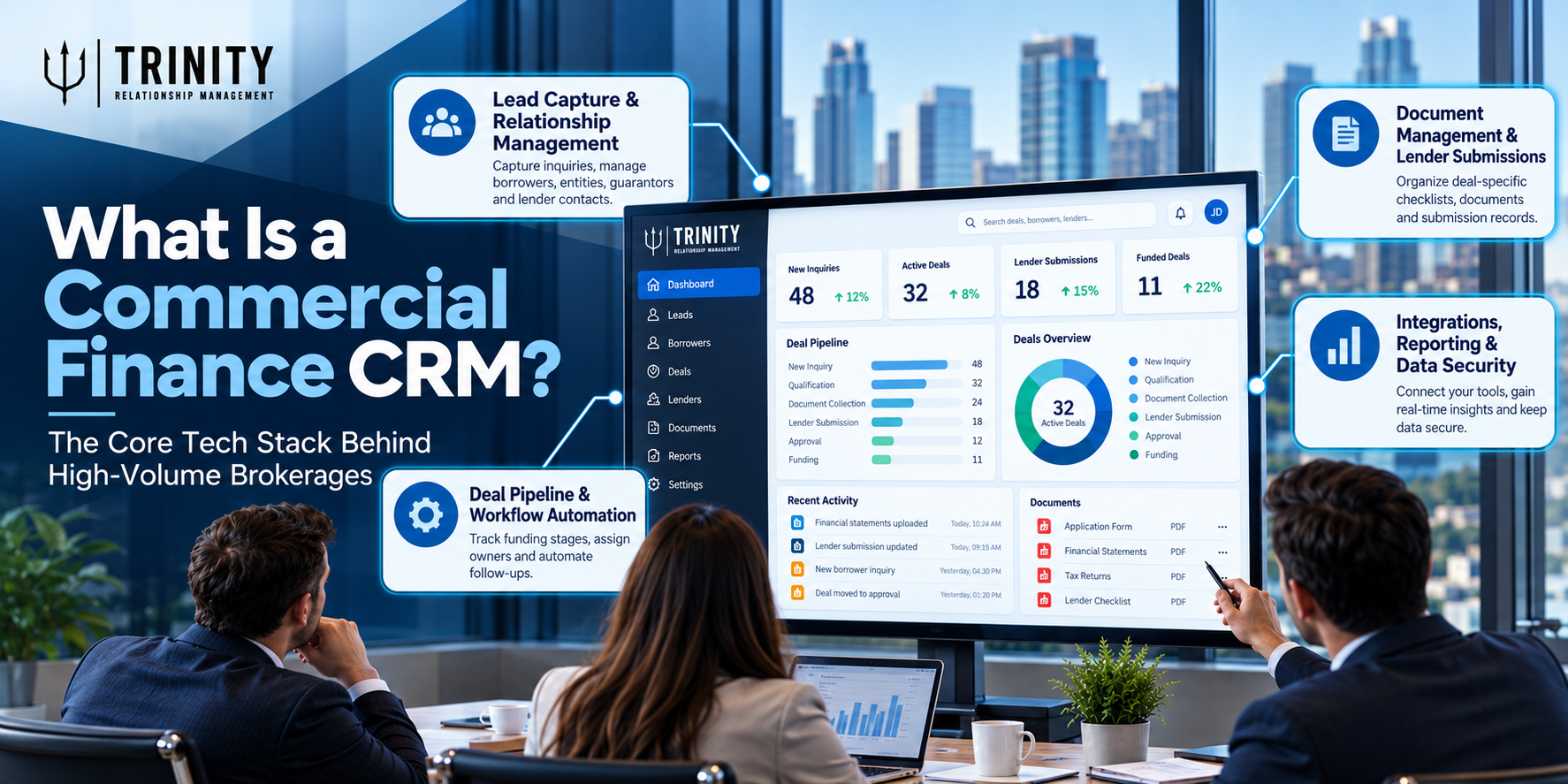
A useful technology stack has several connected layers. Each handles a different part of the deal, but the value comes from how reliably information moves between them.
Lead Capture and Relationship Management
The CRM should capture inquiries from website forms, referral partners, marketing campaigns, and other channels. It should also connect related records, including borrowers, business entities, guarantors, referral sources, and lender contacts.
Lead-source tracking helps brokers identify which channels generate qualified opportunities, not just large numbers of inquiries. A well-planned CRM configuration for the lead and prospect lifecycle also defines how records move from initial contact to qualification, active opportunity, and eventual outcome.
Deal Pipeline and Workflow Automation
A brokerage needs stages that reflect its actual funding process. These might include new inquiry, qualification, document collection, lender submission, approval, and funding.
The system should assign deal owners, record deadlines, and make the next action visible. Automation can create follow-up tasks, send reminders, and update records when defined conditions are met.
The goal is to simplify business processes, not automate every decision. Keep exceptions visible so brokers can intervene when a lender requests additional information or a deal no longer fits the original plan.
Document Management and Lender Submissions
Commercial finance deals often involve financial statements, tax records, application forms, and lender-specific supporting documents. The CRM should associate these items with the correct deal and help teams identify missing information, submission dates, document versions, and lender responses.
Secure storage and appropriate access permissions matter because multiple employees may handle sensitive borrower information. Before choosing a platform, establish whether it stores documents directly, links to a separate document management system, or relies on another application for secure sharing.
Integrations, Reporting, and Data Security
Email, calendars, e-signature tools, accounting applications, and lending platforms may all form part of the stack. APIs and connectors can transfer information between systems, reducing duplicate entry and inconsistent records.
Dashboards should show useful operational measures, including pipeline value, conversion rates, time spent in each stage, and expected commissions. Security features deserve equal attention: evaluate role-based access, audit trails, backup arrangements, retention policies, and data export controls.
How These Systems Work Together Across a Deal
Imagine a business owner requesting equipment financing through a referral partner. The CRM records the inquiry, links the referral source, captures the funding requirement, and assigns a broker.
The broker qualifies the opportunity and creates a document checklist. Reminders help track outstanding financial statements, while lender records show where the application has been submitted and which responses have arrived.
After approval, the team records the outcome, tracks the funding milestone, and updates the relevant commission information. The exact stages depend on the funding product and lender.
Sales, processing, and finance teams can each see the latest status and their next responsibility. The software organizes the handoffs, but it cannot guarantee lender approval or funding.
Generic CRM vs. Commercial Finance CRM
The difference comes down to configuration and workflow fit, rather than the product label alone.
| Evaluation area | Generic CRM | Commercial finance CRM |
|---|---|---|
| Contact management | General customer records | Borrowers, entities, guarantors, and lender contacts |
| Pipeline | Sales opportunities | Funding stages and lender submissions |
| Documents | General file attachments | Deal-specific checklists and submission records |
| Reporting | Sales activity and revenue | Deal progress, funding outcomes, and bottlenecks |
A configurable generic CRM can support commercial finance workflows, but it may need custom fields, automation, integrations, or development. Buyers should compare the actual setup and total implementation cost rather than assuming a specialist product is automatically the better choice.
For example, Salesforce Financial Services Cloud may be worth evaluating when a brokerage needs configurable relationship management and connections to broader Salesforce capabilities.
However, the suitability of any platform depends on the required workflows, integrations, and implementation effort. Salesforce solutions for financial services should be assessed against those practical requirements, not just their feature lists.
What Should You Check Before Buying?
A polished demonstration is not enough. Test whether the system can handle the situations your team encounters every week.
Evaluate these five areas:
Workflow fit: Can it represent your funding products, deal stages, lender submissions, and team handoffs?
Integration depth: Are essential connections built in, provided by third parties, or dependent on custom development?
Security and control: Can you manage permissions, review audit history, set retention rules, and export your data?
Scalability: Can reporting, record ownership, bulk updates, and performance handle realistic deal volumes?
Implementation costs: Have you accounted for licenses, data migration, configuration, training, support, and ongoing integration expenses?
Ask vendors to demonstrate a real but appropriately anonymized deal. Have them show what happens when a document is missing, a lender rejects an application, or a broker leaves, and their files need reassignment.
The right financial CRM unifies client data in a way that makes everyday decisions easier. During evaluation, check whether the system genuinely creates that shared view or simply moves disconnected records into a new interface.
Concluding Words
A commercial finance CRM should support the way your brokerage actually handles relationships, submissions, funding milestones, and reporting. The best choice is not necessarily the platform with the longest feature list. It is the one that removes costly handoffs while keeping ownership and accountability clear.
Start by mapping your current process and identifying where deals stall or information gets lost. Then test shortlisted platforms against those problems, including the exceptions your team handles regularly.
Trinity CRM can help you assess your requirements and explore a solution tailored to your brokerage’s workflows. Request a demo or workflow assessment before committing to a new stack.
FAQs
Is a commercial finance CRM the same as loan origination software?
No. A CRM generally manages relationships, sales activity, and deal visibility, while loan origination software supports application processing. Some platforms combine both capabilities.
Can a commercial finance CRM connect with multiple lenders?
Potentially, depending on available integrations, lender systems, and the brokerage’s submission process. Some lenders may still require manual submissions or follow-up.
When should a brokerage invest in a dedicated CRM?
Consider one when fragmented records, missed follow-ups, repeated data entry, and limited pipeline visibility begin slowing the team down. A workflow assessment can help establish whether a dedicated platform or a configurable existing system is the better fit.